Check a Recruiter's Repo for Malware Before You Run It
twitterfacebooklinkedincopy

Learn how malicious take-home coding tests can hide credential stealers, wallet drainers, and other malware and how to check a recruiter's repository safely before you run it.
How to Check a Recruiter’s Take-Home Repo for Malware Before You Run It

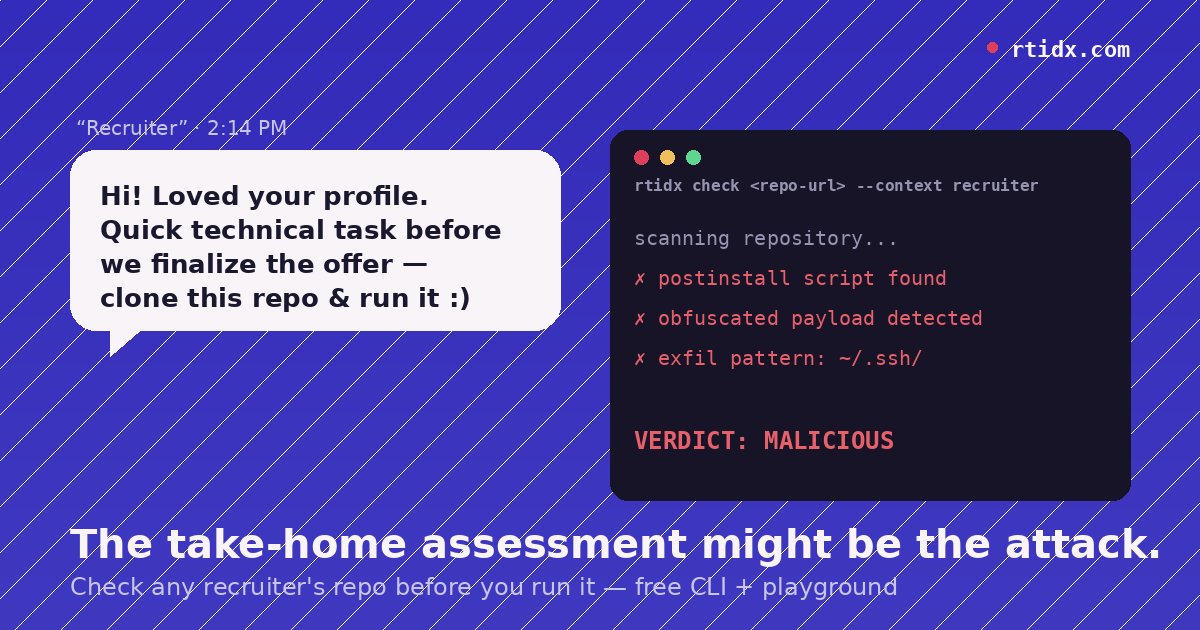
You made it to the final round. The “recruiter” sends a GitHub or Bitbucket link, asks you to clone it, add a small feature, and push a branch by Friday. It looks exactly like every other take-home assessment you’ve done — except this one is designed to steal your SSH keys, your crypto wallet, or your AWS credentials the moment you run npm install.

Security researchers call this pattern the Contagious Interview attack, and it’s one of the fastest-growing scam categories targeting developers, especially in Web3 and crypto hiring. This guide walks through the red flags to check manually, plus a free CLI that automates the check on any real repo — and an interactive browser playground where you can run those same checks yourself against a set of sample repos, no install required. Both come from RTIdx, a threat-intelligence project in our studio focused on this exact scam pattern.

What Is the “Technical Interview” Job Scam?

The pattern is consistent across reported cases: a recruiter persona (often using a stolen identity or a near-identical email with random digits appended, like name214@gmail.com) runs a normal-looking hiring process, then hands over a “technical task” as the final step. The repo runs — the interview feels legitimate — but a script hidden in a postinstall hook, an obfuscated payload buried past the point most reviewers stop reading, or a fake dependency quietly exfiltrates credentials, browser cookies, or wallet files in the background.

Task-based scams cost job seekers tens of millions of dollars in 2024 alone, and the code-injection variant specifically targets developers because it exploits something completely routine: running code you were told to run.

You can browse real reported cases on RTIdx.

The Red Flags to Check Before You Clone

Before you run anything locally, look for:

  • Lifecycle hooks in package.jsonpostinstall, prepare, or preinstall scripts are the most common trigger point; they fire automatically on npm install, before you’ve reviewed a single line of the actual task.
  • Shell-out and dynamic executionchild_process, eval(), or Function() calls that take external input.
  • Obfuscated stringsatob(), Buffer.from(..., 'base64'), or long hex strings with no obvious purpose.
  • Exfiltration paths — code that reaches for .ssh/, .aws/credentials, browser profile folders, .env files, or wallet files (wallet.dat, .bitcoin, .ethereum).
  • Webhook URLs — especially Discord or Telegram bot endpoints, a common low-friction way to receive stolen data.
  • Code length mismatch — the functional part of the task ends in 40–50 lines, but the file runs to several hundred. The extra length is usually where the payload hides.
Check a Recruiter's Repo for Malware Before You Run It
twitterfacebooklinkedincopy

Learn how malicious take-home coding tests can hide credential stealers, wallet drainers, and other malware and how to check a recruiter's repository safely before you run it.

How to Check a Recruiter’s Take-Home Repo for Malware Before You Run It

You made it to the final round. The “recruiter” sends a GitHub or Bitbucket link, asks you to clone it, add a small feature, and push a branch by Friday. It looks exactly like every other take-home assessment you’ve done — except this one is designed to steal your SSH keys, your crypto wallet, or your AWS credentials the moment you run npm install.

Security researchers call this pattern the Contagious Interview attack, and it’s one of the fastest-growing scam categories targeting developers, especially in Web3 and crypto hiring. This guide walks through the red flags to check manually, plus a free CLI that automates the check on any real repo — and an interactive browser playground where you can run those same checks yourself against a set of sample repos, no install required. Both come from RTIdx, a threat-intelligence project in our studio focused on this exact scam pattern.

What Is the “Technical Interview” Job Scam?

The pattern is consistent across reported cases: a recruiter persona (often using a stolen identity or a near-identical email with random digits appended, like name214@gmail.com) runs a normal-looking hiring process, then hands over a “technical task” as the final step. The repo runs — the interview feels legitimate — but a script hidden in a postinstall hook, an obfuscated payload buried past the point most reviewers stop reading, or a fake dependency quietly exfiltrates credentials, browser cookies, or wallet files in the background.

Task-based scams cost job seekers tens of millions of dollars in 2024 alone, and the code-injection variant specifically targets developers because it exploits something completely routine: running code you were told to run.

You can browse real reported cases on RTIdx.

The Red Flags to Check Before You Clone

Before you run anything locally, look for:

  • Lifecycle hooks in package.jsonpostinstall, prepare, or preinstall scripts are the most common trigger point; they fire automatically on npm install, before you’ve reviewed a single line of the actual task.
  • Shell-out and dynamic executionchild_process, eval(), or Function() calls that take external input.
  • Obfuscated stringsatob(), Buffer.from(..., 'base64'), or long hex strings with no obvious purpose.
  • Exfiltration paths — code that reaches for .ssh/, .aws/credentials, browser profile folders, .env files, or wallet files (wallet.dat, .bitcoin, .ethereum).
  • Webhook URLs — especially Discord or Telegram bot endpoints, a common low-friction way to receive stolen data.
  • Code length mismatch — the functional part of the task ends in 40–50 lines, but the file runs to several hundred. The extra length is usually where the payload hides.
twitterfacebooklinkedincopy
Check a Recruiter's Repo for Malware Before You Run It
twitterfacebooklinkedincopy

Learn how malicious take-home coding tests can hide credential stealers, wallet drainers, and other malware and how to check a recruiter's repository safely before you run it.

  1. Read package.json first. Check every lifecycle script before you install anything.
  2. Search the codebase for the patterns above. grep -r "child_process\|eval(\|atob(" . is a five-second start.
  3. Never run it on your daily-driver machine. A throwaway cloud instance or Docker container costs nothing and contains the blast radius if something slips through.
  4. Check the sender, not just the code. Does the recruiter’s email match their LinkedIn? Is it a company domain, or Gmail with digits appended?
  5. Cross-check the repo and any domains it references against a known-campaign database before you trust it.
How to Check a Recruiter’s Take-Home Repo for Malware Before You Run It

You made it to the final round. The “recruiter” sends a GitHub or Bitbucket link, asks you to clone it, add a small feature, and push a branch by Friday. It looks exactly like every other take-home assessment you’ve done — except this one is designed to steal your SSH keys, your crypto wallet, or your AWS credentials the moment you run npm install.

Security researchers call this pattern the Contagious Interview attack, and it’s one of the fastest-growing scam categories targeting developers, especially in Web3 and crypto hiring. This guide walks through the red flags to check manually, plus a free CLI that automates the check on any real repo — and an interactive browser playground where you can run those same checks yourself against a set of sample repos, no install required. Both come from RTIdx, a threat-intelligence project in our studio focused on this exact scam pattern.

What Is the “Technical Interview” Job Scam?

The pattern is consistent across reported cases: a recruiter persona (often using a stolen identity or a near-identical email with random digits appended, like name214@gmail.com) runs a normal-looking hiring process, then hands over a “technical task” as the final step. The repo runs — the interview feels legitimate — but a script hidden in a postinstall hook, an obfuscated payload buried past the point most reviewers stop reading, or a fake dependency quietly exfiltrates credentials, browser cookies, or wallet files in the background.

Task-based scams cost job seekers tens of millions of dollars in 2024 alone, and the code-injection variant specifically targets developers because it exploits something completely routine: running code you were told to run.

You can browse real reported cases on RTIdx.

The Red Flags to Check Before You Clone

Before you run anything locally, look for:

  • Lifecycle hooks in package.jsonpostinstall, prepare, or preinstall scripts are the most common trigger point; they fire automatically on npm install, before you’ve reviewed a single line of the actual task.
  • Shell-out and dynamic executionchild_process, eval(), or Function() calls that take external input.
  • Obfuscated stringsatob(), Buffer.from(..., 'base64'), or long hex strings with no obvious purpose.
  • Exfiltration paths — code that reaches for .ssh/, .aws/credentials, browser profile folders, .env files, or wallet files (wallet.dat, .bitcoin, .ethereum).
  • Webhook URLs — especially Discord or Telegram bot endpoints, a common low-friction way to receive stolen data.
  • Code length mismatch — the functional part of the task ends in 40–50 lines, but the file runs to several hundred. The extra length is usually where the payload hides.
twitterfacebooklinkedincopy
Check a Recruiter's Repo for Malware Before You Run It
twitterfacebooklinkedincopy

Learn how malicious take-home coding tests can hide credential stealers, wallet drainers, and other malware and how to check a recruiter's repository safely before you run it.

  1. Read package.json first. Check every lifecycle script before you install anything.
  2. Search the codebase for the patterns above. grep -r "child_process\|eval(\|atob(" . is a five-second start.
  3. Never run it on your daily-driver machine. A throwaway cloud instance or Docker container costs nothing and contains the blast radius if something slips through.
  4. Check the sender, not just the code. Does the recruiter’s email match their LinkedIn? Is it a company domain, or Gmail with digits appended?
  5. Cross-check the repo and any domains it references against a known-campaign database before you trust it.
How to Check a Recruiter’s Take-Home Repo for Malware Before You Run It

You made it to the final round. The “recruiter” sends a GitHub or Bitbucket link, asks you to clone it, add a small feature, and push a branch by Friday. It looks exactly like every other take-home assessment you’ve done — except this one is designed to steal your SSH keys, your crypto wallet, or your AWS credentials the moment you run npm install.

Security researchers call this pattern the Contagious Interview attack, and it’s one of the fastest-growing scam categories targeting developers, especially in Web3 and crypto hiring. This guide walks through the red flags to check manually, plus a free CLI that automates the check on any real repo — and an interactive browser playground where you can run those same checks yourself against a set of sample repos, no install required. Both come from RTIdx, a threat-intelligence project in our studio focused on this exact scam pattern.

What Is the “Technical Interview” Job Scam?

The pattern is consistent across reported cases: a recruiter persona (often using a stolen identity or a near-identical email with random digits appended, like name214@gmail.com) runs a normal-looking hiring process, then hands over a “technical task” as the final step. The repo runs — the interview feels legitimate — but a script hidden in a postinstall hook, an obfuscated payload buried past the point most reviewers stop reading, or a fake dependency quietly exfiltrates credentials, browser cookies, or wallet files in the background.

Task-based scams cost job seekers tens of millions of dollars in 2024 alone, and the code-injection variant specifically targets developers because it exploits something completely routine: running code you were told to run.

You can browse real reported cases on RTIdx.

The Red Flags to Check Before You Clone

Before you run anything locally, look for:

  • Lifecycle hooks in package.jsonpostinstall, prepare, or preinstall scripts are the most common trigger point; they fire automatically on npm install, before you’ve reviewed a single line of the actual task.
  • Shell-out and dynamic executionchild_process, eval(), or Function() calls that take external input.
  • Obfuscated stringsatob(), Buffer.from(..., 'base64'), or long hex strings with no obvious purpose.
  • Exfiltration paths — code that reaches for .ssh/, .aws/credentials, browser profile folders, .env files, or wallet files (wallet.dat, .bitcoin, .ethereum).
  • Webhook URLs — especially Discord or Telegram bot endpoints, a common low-friction way to receive stolen data.
  • Code length mismatch — the functional part of the task ends in 40–50 lines, but the file runs to several hundred. The extra length is usually where the payload hides.
twitterfacebooklinkedincopy
Check a Recruiter's Repo for Malware Before You Run It
twitterfacebooklinkedincopy

Learn how malicious take-home coding tests can hide credential stealers, wallet drainers, and other malware and how to check a recruiter's repository safely before you run it.

  1. Read package.json first. Check every lifecycle script before you install anything.
  2. Search the codebase for the patterns above. grep -r "child_process\|eval(\|atob(" . is a five-second start.
  3. Never run it on your daily-driver machine. A throwaway cloud instance or Docker container costs nothing and contains the blast radius if something slips through.
  4. Check the sender, not just the code. Does the recruiter’s email match their LinkedIn? Is it a company domain, or Gmail with digits appended?
  5. Cross-check the repo and any domains it references against a known-campaign database before you trust it.
How to Check a Recruiter’s Take-Home Repo for Malware Before You Run It

You made it to the final round. The “recruiter” sends a GitHub or Bitbucket link, asks you to clone it, add a small feature, and push a branch by Friday. It looks exactly like every other take-home assessment you’ve done — except this one is designed to steal your SSH keys, your crypto wallet, or your AWS credentials the moment you run npm install.

Security researchers call this pattern the Contagious Interview attack, and it’s one of the fastest-growing scam categories targeting developers, especially in Web3 and crypto hiring. This guide walks through the red flags to check manually, plus a free CLI that automates the check on any real repo — and an interactive browser playground where you can run those same checks yourself against a set of sample repos, no install required. Both come from RTIdx, a threat-intelligence project in our studio focused on this exact scam pattern.

What Is the “Technical Interview” Job Scam?

The pattern is consistent across reported cases: a recruiter persona (often using a stolen identity or a near-identical email with random digits appended, like name214@gmail.com) runs a normal-looking hiring process, then hands over a “technical task” as the final step. The repo runs — the interview feels legitimate — but a script hidden in a postinstall hook, an obfuscated payload buried past the point most reviewers stop reading, or a fake dependency quietly exfiltrates credentials, browser cookies, or wallet files in the background.

Task-based scams cost job seekers tens of millions of dollars in 2024 alone, and the code-injection variant specifically targets developers because it exploits something completely routine: running code you were told to run.

You can browse real reported cases on RTIdx.

The Red Flags to Check Before You Clone

Before you run anything locally, look for:

  • Lifecycle hooks in package.jsonpostinstall, prepare, or preinstall scripts are the most common trigger point; they fire automatically on npm install, before you’ve reviewed a single line of the actual task.
  • Shell-out and dynamic executionchild_process, eval(), or Function() calls that take external input.
  • Obfuscated stringsatob(), Buffer.from(..., 'base64'), or long hex strings with no obvious purpose.
  • Exfiltration paths — code that reaches for .ssh/, .aws/credentials, browser profile folders, .env files, or wallet files (wallet.dat, .bitcoin, .ethereum).
  • Webhook URLs — especially Discord or Telegram bot endpoints, a common low-friction way to receive stolen data.
  • Code length mismatch — the functional part of the task ends in 40–50 lines, but the file runs to several hundred. The extra length is usually where the payload hides.
Manual Steps to Check Any Repo
  1. Read package.json first. Check every lifecycle script before you install anything.
  2. Search the codebase for the patterns above. grep -r "child_process\|eval(\|atob(" . is a five-second start.
  3. Never run it on your daily-driver machine. A throwaway cloud instance or Docker container costs nothing and contains the blast radius if something slips through.
  4. Check the sender, not just the code. Does the recruiter’s email match their LinkedIn? Is it a company domain, or Gmail with digits appended?
  5. Cross-check the repo and any domains it references against a known-campaign database before you trust it.
Automate It: The RTIdx CLI and Browser Playground

Manually reading every file doesn’t scale, so the RTIdx team built @rtidx/cli — point it at a real repo and it runs the checks above automatically: lifecycle hooks, exfiltration patterns, obfuscation, and known campaign fingerprints, all via static analysis. Nothing in the target repo executes.

npm i -g @rtidx/cli
rtidx login
rtidx check <repo-url> --context recruiter

The --context flag tells it why you’re looking at the repo — recruiter for a job offer, client for freelance work, dependency for a package you’re evaluating, unsolicited, self, or other — since what’s a red flag depends on the situation you’re actually in.

If you want to try it before installing anything, RTIdx has a browser-based playground — a real, interactive terminal where you pick from a set of sample repos and run the actual checks yourself. It’s not wired to scan any repo on the internet — the sample set is fixed — so treat it as hands-on practice with the tool rather than a way to check the specific repo you were sent. For that, install the CLI above. You can also see the CLI demo directly.

What to Do If You Already Ran It

If you’ve already run a suspicious task locally:

  • Rotate every credential the repo could have reached — SSH keys, AWS/Stripe keys, npm tokens.
  • Move any crypto assets to a new wallet if the machine ever held a seed phrase or .env with private keys.
  • Revoke and reissue browser session tokens for anything you were logged into.
  • Report the repo to its host (GitHub/Bitbucket) and to the platform where the recruiter contacted you.
FAQ

Is it normal for a job interview to include a take-home coding test?

Yes — take-home assessments are a standard part of technical hiring. The scam exploits that normalcy; the red flag isn’t the task itself, it’s what’s hidden inside it.

Does running npm install automatically execute malicious code?

It can. Lifecycle hooks like postinstall run automatically during install, before you’ve opened a single file — this is the most common delivery mechanism in these scams.

What does the RTIdx CLI actually check?

Static analysis only — it never executes the target code. It looks for lifecycle-hook abuse, known exfiltration and obfuscation patterns, and fingerprints matched against previously reported campaigns.

What does the --context flag do?

It tells the CLI why you’re checking the repo — a recruiter offer, a freelance client, a dependency you’re evaluating, or your own project — so the check is read against the right situation instead of a one-size-fits-all rule set.

Do I need to install anything to try it?

Not to try the checks yourself — the browser playground is a real, interactive terminal with a set of sample repos you can run scans against, zero setup. The sample repos are fixed, though; to check the specific repo you were sent, install the CLI.

Is @rtidx/cli free?

Yes, it’s free and published on npm.

Try It

If a “recruiter” has ever sent you a repo that felt slightly off, that instinct is usually worth trusting. Try the checks yourself against sample repos in RTIdx’s playground (interactive, no install), then check the actual repo you were sent by installing the CLI:

npm i -g @rtidx/cli
rtidx login
rtidx check <repo-url> --context recruiter

If you write about developer security, run a newsletter, or moderate a community where this comes up — feel free to link to this guide or the checklist above. The more places developers can find it before they hit npm install, the fewer wallets and keys get drained.

Further reading: the FTC’s consumer alert on task scams and the FBI’s Operation Level Up advisory on pig-butchering and task scams.

About RTIdx

RTIdx (Recruitment Threat Index) is a community-powered threat intelligence platform tracking recruitment scams targeting developers, built within our studio. Browse reported cases or try the tools yourself at rtidx.com.

twitterfacebooklinkedincopy
Check a Recruiter's Repo for Malware Before You Run It
twitterfacebooklinkedincopy

Learn how malicious take-home coding tests can hide credential stealers, wallet drainers, and other malware and how to check a recruiter's repository safely before you run it.

  1. Read package.json first. Check every lifecycle script before you install anything.
  2. Search the codebase for the patterns above. grep -r "child_process\|eval(\|atob(" . is a five-second start.
  3. Never run it on your daily-driver machine. A throwaway cloud instance or Docker container costs nothing and contains the blast radius if something slips through.
  4. Check the sender, not just the code. Does the recruiter’s email match their LinkedIn? Is it a company domain, or Gmail with digits appended?
  5. Cross-check the repo and any domains it references against a known-campaign database before you trust it.
How to Check a Recruiter’s Take-Home Repo for Malware Before You Run It

You made it to the final round. The “recruiter” sends a GitHub or Bitbucket link, asks you to clone it, add a small feature, and push a branch by Friday. It looks exactly like every other take-home assessment you’ve done — except this one is designed to steal your SSH keys, your crypto wallet, or your AWS credentials the moment you run npm install.

Security researchers call this pattern the Contagious Interview attack, and it’s one of the fastest-growing scam categories targeting developers, especially in Web3 and crypto hiring. This guide walks through the red flags to check manually, plus a free CLI that automates the check on any real repo — and an interactive browser playground where you can run those same checks yourself against a set of sample repos, no install required. Both come from RTIdx, a threat-intelligence project in our studio focused on this exact scam pattern.

What Is the “Technical Interview” Job Scam?

The pattern is consistent across reported cases: a recruiter persona (often using a stolen identity or a near-identical email with random digits appended, like name214@gmail.com) runs a normal-looking hiring process, then hands over a “technical task” as the final step. The repo runs — the interview feels legitimate — but a script hidden in a postinstall hook, an obfuscated payload buried past the point most reviewers stop reading, or a fake dependency quietly exfiltrates credentials, browser cookies, or wallet files in the background.

Task-based scams cost job seekers tens of millions of dollars in 2024 alone, and the code-injection variant specifically targets developers because it exploits something completely routine: running code you were told to run.

You can browse real reported cases on RTIdx.

The Red Flags to Check Before You Clone

Before you run anything locally, look for:

  • Lifecycle hooks in package.jsonpostinstall, prepare, or preinstall scripts are the most common trigger point; they fire automatically on npm install, before you’ve reviewed a single line of the actual task.
  • Shell-out and dynamic executionchild_process, eval(), or Function() calls that take external input.
  • Obfuscated stringsatob(), Buffer.from(..., 'base64'), or long hex strings with no obvious purpose.
  • Exfiltration paths — code that reaches for .ssh/, .aws/credentials, browser profile folders, .env files, or wallet files (wallet.dat, .bitcoin, .ethereum).
  • Webhook URLs — especially Discord or Telegram bot endpoints, a common low-friction way to receive stolen data.
  • Code length mismatch — the functional part of the task ends in 40–50 lines, but the file runs to several hundred. The extra length is usually where the payload hides.
Manual Steps to Check Any Repo
  1. Read package.json first. Check every lifecycle script before you install anything.
  2. Search the codebase for the patterns above. grep -r "child_process\|eval(\|atob(" . is a five-second start.
  3. Never run it on your daily-driver machine. A throwaway cloud instance or Docker container costs nothing and contains the blast radius if something slips through.
  4. Check the sender, not just the code. Does the recruiter’s email match their LinkedIn? Is it a company domain, or Gmail with digits appended?
  5. Cross-check the repo and any domains it references against a known-campaign database before you trust it.
Automate It: The RTIdx CLI and Browser Playground

Manually reading every file doesn’t scale, so the RTIdx team built @rtidx/cli — point it at a real repo and it runs the checks above automatically: lifecycle hooks, exfiltration patterns, obfuscation, and known campaign fingerprints, all via static analysis. Nothing in the target repo executes.

npm i -g @rtidx/cli
rtidx login
rtidx check <repo-url> --context recruiter

The --context flag tells it why you’re looking at the repo — recruiter for a job offer, client for freelance work, dependency for a package you’re evaluating, unsolicited, self, or other — since what’s a red flag depends on the situation you’re actually in.

If you want to try it before installing anything, RTIdx has a browser-based playground — a real, interactive terminal where you pick from a set of sample repos and run the actual checks yourself. It’s not wired to scan any repo on the internet — the sample set is fixed — so treat it as hands-on practice with the tool rather than a way to check the specific repo you were sent. For that, install the CLI above. You can also see the CLI demo directly.

What to Do If You Already Ran It

If you’ve already run a suspicious task locally:

  • Rotate every credential the repo could have reached — SSH keys, AWS/Stripe keys, npm tokens.
  • Move any crypto assets to a new wallet if the machine ever held a seed phrase or .env with private keys.
  • Revoke and reissue browser session tokens for anything you were logged into.
  • Report the repo to its host (GitHub/Bitbucket) and to the platform where the recruiter contacted you.
FAQ

Is it normal for a job interview to include a take-home coding test?

Yes — take-home assessments are a standard part of technical hiring. The scam exploits that normalcy; the red flag isn’t the task itself, it’s what’s hidden inside it.

Does running npm install automatically execute malicious code?

It can. Lifecycle hooks like postinstall run automatically during install, before you’ve opened a single file — this is the most common delivery mechanism in these scams.

What does the RTIdx CLI actually check?

Static analysis only — it never executes the target code. It looks for lifecycle-hook abuse, known exfiltration and obfuscation patterns, and fingerprints matched against previously reported campaigns.

What does the --context flag do?

It tells the CLI why you’re checking the repo — a recruiter offer, a freelance client, a dependency you’re evaluating, or your own project — so the check is read against the right situation instead of a one-size-fits-all rule set.

Do I need to install anything to try it?

Not to try the checks yourself — the browser playground is a real, interactive terminal with a set of sample repos you can run scans against, zero setup. The sample repos are fixed, though; to check the specific repo you were sent, install the CLI.

Is @rtidx/cli free?

Yes, it’s free and published on npm.

Try It

If a “recruiter” has ever sent you a repo that felt slightly off, that instinct is usually worth trusting. Try the checks yourself against sample repos in RTIdx’s playground (interactive, no install), then check the actual repo you were sent by installing the CLI:

npm i -g @rtidx/cli
rtidx login
rtidx check <repo-url> --context recruiter

If you write about developer security, run a newsletter, or moderate a community where this comes up — feel free to link to this guide or the checklist above. The more places developers can find it before they hit npm install, the fewer wallets and keys get drained.

Further reading: the FTC’s consumer alert on task scams and the FBI’s Operation Level Up advisory on pig-butchering and task scams.

About RTIdx

RTIdx (Recruitment Threat Index) is a community-powered threat intelligence platform tracking recruitment scams targeting developers, built within our studio. Browse reported cases or try the tools yourself at rtidx.com.

twitterfacebooklinkedincopy
Check a Recruiter's Repo for Malware Before You Run It
twitterfacebooklinkedincopy

Learn how malicious take-home coding tests can hide credential stealers, wallet drainers, and other malware and how to check a recruiter's repository safely before you run it.

  1. Read package.json first. Check every lifecycle script before you install anything.
  2. Search the codebase for the patterns above. grep -r "child_process\|eval(\|atob(" . is a five-second start.
  3. Never run it on your daily-driver machine. A throwaway cloud instance or Docker container costs nothing and contains the blast radius if something slips through.
  4. Check the sender, not just the code. Does the recruiter’s email match their LinkedIn? Is it a company domain, or Gmail with digits appended?
  5. Cross-check the repo and any domains it references against a known-campaign database before you trust it.
How to Check a Recruiter’s Take-Home Repo for Malware Before You Run It

You made it to the final round. The “recruiter” sends a GitHub or Bitbucket link, asks you to clone it, add a small feature, and push a branch by Friday. It looks exactly like every other take-home assessment you’ve done — except this one is designed to steal your SSH keys, your crypto wallet, or your AWS credentials the moment you run npm install.

Security researchers call this pattern the Contagious Interview attack, and it’s one of the fastest-growing scam categories targeting developers, especially in Web3 and crypto hiring. This guide walks through the red flags to check manually, plus a free CLI that automates the check on any real repo — and an interactive browser playground where you can run those same checks yourself against a set of sample repos, no install required. Both come from RTIdx, a threat-intelligence project in our studio focused on this exact scam pattern.

What Is the “Technical Interview” Job Scam?

The pattern is consistent across reported cases: a recruiter persona (often using a stolen identity or a near-identical email with random digits appended, like name214@gmail.com) runs a normal-looking hiring process, then hands over a “technical task” as the final step. The repo runs — the interview feels legitimate — but a script hidden in a postinstall hook, an obfuscated payload buried past the point most reviewers stop reading, or a fake dependency quietly exfiltrates credentials, browser cookies, or wallet files in the background.

Task-based scams cost job seekers tens of millions of dollars in 2024 alone, and the code-injection variant specifically targets developers because it exploits something completely routine: running code you were told to run.

You can browse real reported cases on RTIdx.

The Red Flags to Check Before You Clone

Before you run anything locally, look for:

  • Lifecycle hooks in package.jsonpostinstall, prepare, or preinstall scripts are the most common trigger point; they fire automatically on npm install, before you’ve reviewed a single line of the actual task.
  • Shell-out and dynamic executionchild_process, eval(), or Function() calls that take external input.
  • Obfuscated stringsatob(), Buffer.from(..., 'base64'), or long hex strings with no obvious purpose.
  • Exfiltration paths — code that reaches for .ssh/, .aws/credentials, browser profile folders, .env files, or wallet files (wallet.dat, .bitcoin, .ethereum).
  • Webhook URLs — especially Discord or Telegram bot endpoints, a common low-friction way to receive stolen data.
  • Code length mismatch — the functional part of the task ends in 40–50 lines, but the file runs to several hundred. The extra length is usually where the payload hides.
Manual Steps to Check Any Repo
  1. Read package.json first. Check every lifecycle script before you install anything.
  2. Search the codebase for the patterns above. grep -r "child_process\|eval(\|atob(" . is a five-second start.
  3. Never run it on your daily-driver machine. A throwaway cloud instance or Docker container costs nothing and contains the blast radius if something slips through.
  4. Check the sender, not just the code. Does the recruiter’s email match their LinkedIn? Is it a company domain, or Gmail with digits appended?
  5. Cross-check the repo and any domains it references against a known-campaign database before you trust it.
Automate It: The RTIdx CLI and Browser Playground

Manually reading every file doesn’t scale, so the RTIdx team built @rtidx/cli — point it at a real repo and it runs the checks above automatically: lifecycle hooks, exfiltration patterns, obfuscation, and known campaign fingerprints, all via static analysis. Nothing in the target repo executes.

npm i -g @rtidx/cli
rtidx login
rtidx check <repo-url> --context recruiter

The --context flag tells it why you’re looking at the repo — recruiter for a job offer, client for freelance work, dependency for a package you’re evaluating, unsolicited, self, or other — since what’s a red flag depends on the situation you’re actually in.

If you want to try it before installing anything, RTIdx has a browser-based playground — a real, interactive terminal where you pick from a set of sample repos and run the actual checks yourself. It’s not wired to scan any repo on the internet — the sample set is fixed — so treat it as hands-on practice with the tool rather than a way to check the specific repo you were sent. For that, install the CLI above. You can also see the CLI demo directly.

What to Do If You Already Ran It

If you’ve already run a suspicious task locally:

  • Rotate every credential the repo could have reached — SSH keys, AWS/Stripe keys, npm tokens.
  • Move any crypto assets to a new wallet if the machine ever held a seed phrase or .env with private keys.
  • Revoke and reissue browser session tokens for anything you were logged into.
  • Report the repo to its host (GitHub/Bitbucket) and to the platform where the recruiter contacted you.
FAQ

Is it normal for a job interview to include a take-home coding test?

Yes — take-home assessments are a standard part of technical hiring. The scam exploits that normalcy; the red flag isn’t the task itself, it’s what’s hidden inside it.

Does running npm install automatically execute malicious code?

It can. Lifecycle hooks like postinstall run automatically during install, before you’ve opened a single file — this is the most common delivery mechanism in these scams.

What does the RTIdx CLI actually check?

Static analysis only — it never executes the target code. It looks for lifecycle-hook abuse, known exfiltration and obfuscation patterns, and fingerprints matched against previously reported campaigns.

What does the --context flag do?

It tells the CLI why you’re checking the repo — a recruiter offer, a freelance client, a dependency you’re evaluating, or your own project — so the check is read against the right situation instead of a one-size-fits-all rule set.

Do I need to install anything to try it?

Not to try the checks yourself — the browser playground is a real, interactive terminal with a set of sample repos you can run scans against, zero setup. The sample repos are fixed, though; to check the specific repo you were sent, install the CLI.

Is @rtidx/cli free?

Yes, it’s free and published on npm.

Try It

If a “recruiter” has ever sent you a repo that felt slightly off, that instinct is usually worth trusting. Try the checks yourself against sample repos in RTIdx’s playground (interactive, no install), then check the actual repo you were sent by installing the CLI:

npm i -g @rtidx/cli
rtidx login
rtidx check <repo-url> --context recruiter

If you write about developer security, run a newsletter, or moderate a community where this comes up — feel free to link to this guide or the checklist above. The more places developers can find it before they hit npm install, the fewer wallets and keys get drained.

Further reading: the FTC’s consumer alert on task scams and the FBI’s Operation Level Up advisory on pig-butchering and task scams.

About RTIdx

RTIdx (Recruitment Threat Index) is a community-powered threat intelligence platform tracking recruitment scams targeting developers, built within our studio. Browse reported cases or try the tools yourself at rtidx.com.

defdone logo
Metaverse:
Challenges and Perspectives
Dive deep into an analysis of the current landscape and future potential of the Metaverse!
Get the report:
metaverse book
Let's Talk!
Uploading...
fileuploaded.jpg
Upload failed. Max size for files is 10 MB.
Thank you! Your submission has been received!
Oops! Something went wrong while submitting the form.